china obd2 diangostic tool blog
obd2toolbella
暱稱: bella
性別: 女
國家: 美國
地區: 其他地區
« August 2026 »
SMTWTFS
1
2345678
9101112131415
16171819202122
23242526272829
3031
最新文章
the Mercedes Benz W2...
Change BMW E Series ...
GM MDI 2 Software Up...
How To Reset ECU in ...
HOW TO CLONE CHIP 46...
文章分類
全部 (152)
訪客留言
最近三個月尚無任何留言
每月文章
日誌訂閱
尚未訂閱任何日誌
好友名單
尚無任何好友
網站連結
尚無任何連結
最近訪客
最近沒有訪客
日誌統計
文章總數: 152
留言總數: 0
今日人氣: 29
累積人氣: 474
站內搜尋
RSS 訂閱
RSS Feed
2021 年 12 月 16 日  星期四   晴天


HOW TO USE STAR DIAGNOSIS CODING OUT ABC ON R230 CARS 分類: 未分類

 To do this, you need a Star diagnostic SD Connect C4 with Developer mode. Hook up SD Connect diagnostic system to your car and when it reads your car, select Control Units, pick Information and Communication and you will see ICM :

After ICM, you will see Control Unit Adaptions :
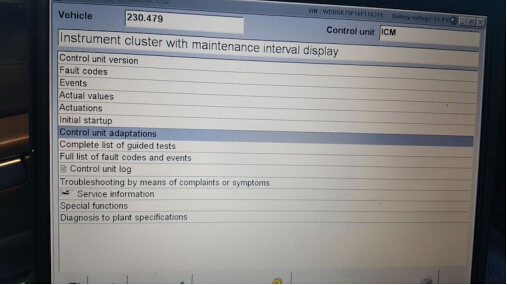
How-To-Use-Star-Diagnosis-Coding-Out-ABC-on-R230-Cars-1

From there, choose the year of your model :
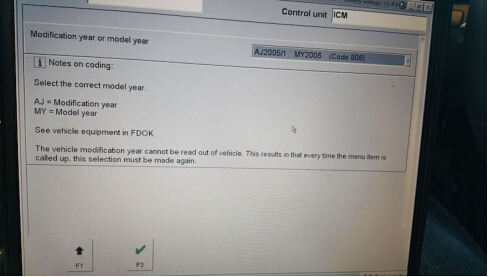
How-To-Use-Star-Diagnosis-Coding-Out-ABC-on-R230-Cars-2

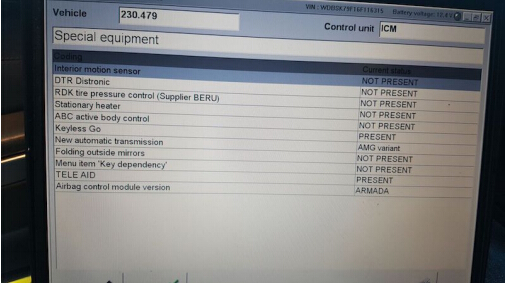
From there, select Special Equipment

How-To-Use-Star-Diagnosis-Coding-Out-ABC-on-R230-Cars-3

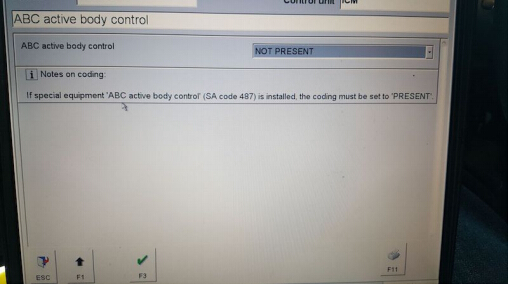
Select ABC :

How-To-Use-Star-Diagnosis-Coding-Out-ABC-on-R230-Cars-4

• Then go to the drop down tab and change it from PRESENT to NOT PRESENT, and click F3.
• After that, turn off the car, with the doors closed.
• Wait 1-2 mins and start the car back up (no more ABC codes and no white or red lights).


訪客留言 (返回 obd2toolbella 的日誌)

訪客名稱:
電郵地址: (不會公開)
驗證碼:  按此更新驗證碼 (如看不清楚驗證碼請點擊圖片刷新)
俏俏話: (必需 登入 後才能使用此功能)
[ 關閉多功能編輯器 ]