If, previously, you have disabled “show VIN in menu” (because Carson’s activator) you can enable again following the next steps:
Note:For more about Professional Diagnostic Tool Audi MMI Repair articles,please check:Audi MMI Repair
Open Green Menu:
MMI 2G SETUP + CAR
MMI 3G SETUP + CAR
MMI 3GP CAR + MENU
RMC CAR + MENU
MIB Not available
Go to car/carextdevicelist and check “VIN”
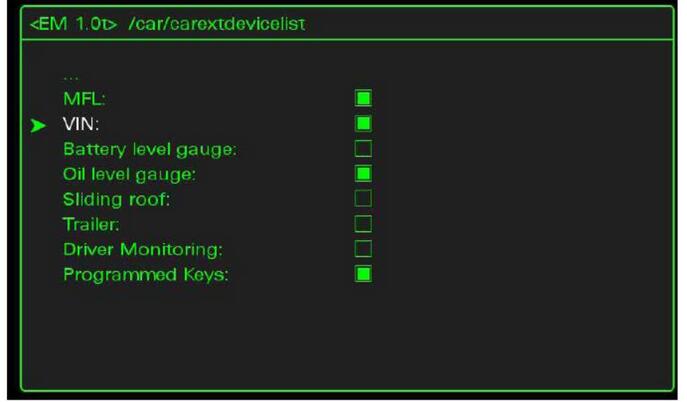
Go back (click in …)
Go to car/carmenuoperation
Scroll down to VIN and set VIN value to “5”

Exit from Green Menu with the CAR button.
Reboot Your MMI
MMI 2G SETUP + Main (Big) Button + Top Right Button
MMI 2G (A8) TEL + Main (Big) Button + Top Right Button
MMI 3G SETUP + Main (Big) Button + Top Right Button
MMI 3GP MENU + Main (Big) Button + Top Right Button
MMI 3GP (A1) TONE + Main (Big) Button + Top Right Button
RMC (A1/Q3) BACK + Main (Big) Button + Top Right Button
RMC (A6/A7) MENU + Main (Big) Button + Top Right Button
MIB MENU + Main (Big) Button + Top Right Button
|



